VESA Adaptive-Sync V2 Operation in DisplayPort VIP

Need for Synchronization
In a computer system, both the GPU as well as the monitor have a certain rate at which they render or update an image, respectively. The rate is nothing but the frequency at which the image is refreshed (updated in the image it shows/displays), usually expressed in hertz, and can vary based on the content displayed on the screen.
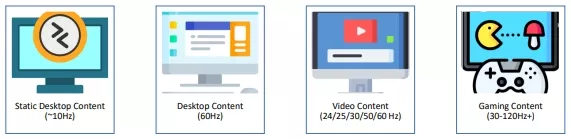
Figure 1: Refresh rate requirements under different applications
For both the GPU as well as the monitor, it is mandatory that their rates should be in sync with one another, because when the display's refresh rate is not synchronized with the content's frame rate, then there are two scenarios t can occur and can create undesirable effects for the user:
Scenario – I: When the GPU's frame rate is higher than the display's refresh rate, the user can experience screen tearing, i.e., parts of the screen display different frames at the same time.
Scenario – II: When the GPU's frame rate is less than the display's refresh rate, the user can experience screen stuttering, i.e., the frames will be either repeated or frozen.
Now, to eliminate this, there are two options.
Option – I: The GPU dynamically adjusts its fps to always comply with the display's refresh rate.
Option – II: The display's refresh rate adjusts to the GPU's variable fps.
With Option-I, the GPU will be capped to the display's maximum refresh rate and will not be used to its full extent, which will eventually eliminate screen tearing (Scenario - I), but the same GPU will also be forced to generate higher FPS above its capability to match the display's refresh rate, which will eventually generate screen stuttering (Scenario-II).
With Option-II, the display will always adapt to the GPU's unpredictable fps and will eliminate both screens tearing as well as stuttering.
Till now, we have already been using a similar technology to Option-I known as "V-Sync". But as this technology was not able to solve the problem of screen stuttering, a new technology was developed similar to Option-II, known as "Adaptive Sync," which was developed by VESA.
Modes of Adaptive-Sync Operation
The Adaptive Sync operation is divided into two parts, namely FAVT (Fixed Average VTotal) and AVT (Adaptive VTotal) where VTotal(Vertical Total) represents the total number of horizontal lines in a frame that consists of pixel information.
The FAVT is typically meant for media playback, whereas the AVT is typically meant for games or other applications where the content's frame rate is unpredictable.
During both the operations, the VTotal is changed to indirectly increase/decrease the refresh rate. As the refresh rate is inversely proportional to frame duration, the increase in VTotal/Frame duration decreases the refresh rate and the decrease in VTotal/Frame duration increases the refresh rate. The VTotal is nothing but a summation of blanking lines and active lines (refer Figure – 2.). The active lines are the ones that contain the actual pixel information that will be used to create the image that will be displayed on the screen and the blanking lines are used to share additional information (such as Secondary Data Packets, Mainstream Attributes, etc.) that are related to a frame.
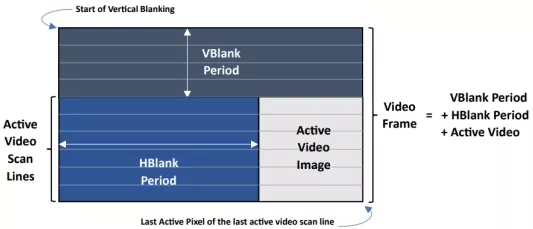
Figure 2: Pictorial representation of Video Frame and Active Video Image
To change the VTotal, the blanking lines are increased/decreased by changing the relative position of Adaptive Sync SDP as described in Figure – 3. This SDP is always sent with each frame before the "Start of Vertical Blanking", resulting in the Actual Vtotal to be the summation of "AS SDP position (blanking lines before AS SDP) + VStart (Vertical blanking lines) + VHeight (active lines)" so that the source could calculate the successive frame parameters such as successive frame's AS SDP position, VTotal and refresh rate.
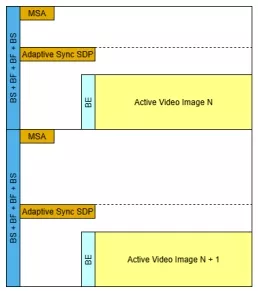
Figure 3 - AS SDP Transmission Timing
The Adaptive Sync SDP is a secondary data packet sent during blanking regions that contains various header and payload bytes which defines their type and functionality such as its version, mode of operation i.e., FAVT or AVT and the refresh rate transition information whether the transition is bounded (might take more than one frame to achieve target refresh rate) or unbounded (target refresh rate is achieved in single frame boundary) and what will be the constraint (frame duration increase/decrease limit) for the transition during bounded scenario as described in Table-1 and Table-2.
| Byte | Bit | Content |
| HB0 | 7:0 | Secondary-data Packet-ID |
| HB1 | 7:0 | Secondary -data Packet Type 22h = Adaptive sync |
| HB2 | 4:0 | Version Number 01h = Version 1 02h = Version 2 |
| 7:5 | RESERVED | |
| HB3 | 5:0 | Number of Valid Data Bytes Version 1 00h = No payload data bytes Version 2 09h = Nine payload data bytes |
| 7:6 | RESERVED |
| Bytes | Bit | Content |
| DB0 | 0 | VARIABLE_FRAME_RATE_DISABLE |
| 1 | Adaptive Sync Operation Mode | |
| 2 | Adaptive Sync SDP Transmission Disable in PR Active State | |
| 3 | Remote Frame Buffer (RFB) Update in PR Active State | |
| 7:4 | RESERVED | |
| DB1 | 7:0 | Minimum Vertical Total 7:0 |
| 7:0 | Minimum Vertical Total 15:8 | |
| DB3 | 7:0 | Target Refresh Rate 7:0 |
| DB4 | 1:0 | Target Refresh Rate 9:8 |
| 4:2 | RESERVED | |
| 5 | Target Refresh Rate Divider | |
| 6 | Successive Frame Duration Increase Configuration | |
| 7 | Successive Frame Duration Decrease Configuration | |
| DB5 | 7:0 | Duration Increase Constraint Value in ms Unit |
| DB6 | 7:0 | Duration Decrease Constraint Value in ms Unit |
| DB7 | 7:0 | Coasting VTotal 7:0 in PR Active State |
| DB8 | 7:0 | Coasting VTotal 15:8 in Pr Active State |
| DB9 through DB31 | 191:0 | RESERVED Read all 0s |
Conclusion
The Cadence VIP Model supports both modes of operation for Adaptive-Sync i.e., FAVT(DB0[1] = 1) & AVT(DB0[1] = 0).
During FAVT mode of operation, in case of bounded config the model increase/decrease the frame duration once per frame using the constraint values (DB5/DB6) until the on-panel frame duration matches the Target frame duration (inverted {DB4[1:0], DB3[7:0]}). In case the increase/decrease frame duration is unbounded the TRR is achieved across a single frame boundary.
During AVT mode of operation the model increase/decrease the frame duration to reach minimum or maximum frame duration supported by Sink device. The Source will honor the frame duration constraint in case of bounded transition and in case of unbounded transition the Refresh Rate may transition to minimum/maximum frame duration across single frame boundary.
Learn More
- Cadence has a very mature Verification IP solution. Verification over many different configurations can be used with DisplayPort 2.1 and DisplayPort 1.4 designs, so you can choose the best version for your specific needs.
- The DisplayPort VIP provides a full-stack solution for Sink and Source devices with a comprehensive coverage model, protocol checkers, and an extensive test suite.
- More details available on Simulation VIP for Display Port
- For more information on VESA's DisplayPort in general. Visit the official website at vesa.org.
- If you have more feedback or need more information, reach out to us.
Related Semiconductor IP
- HDCP 2 on HDMI / DisplayPort Embedded Security Module Firmware (generation 3)
- 4-port Receiver/Transmitter/Repeater HDCP 2.3 on HDMI 2.0 and/or DisplayPort 2.0/1.4 ESM (generation 3)
- 2-port Receiver/Transmitter/Repeater HDCP 2.3 on HDMI 2.0 and/or DisplayPort 2.0/1.4 ESM (generation 3)
- 1-port Receiver/Transmitter HDCP 2.3 on HDMI 2.0 or DisplayPort 1.4/2.0 ESM (generation 3)
- DisplayPort Link Policy Maker
Related Blogs
- Audio Transport in DisplayPort VIP
- Compatibility Is Good, But Compliance Is Better - Certifying for VESA DisplayPort
- What's New in DisplayPort 2.0 - 20Gbps, 16K and much more...
- Beyond Mobility, MIPI CSI-2 v2.1 now in Automotive, Drones and IoT
Latest Blogs
- Ensuring reliability in Advanced IC design
- A Closer Look at proteanTecs Health and Performance Management Solutions Portfolio
- Enabling Memory Choice for Modern AI Systems: Tenstorrent and Rambus Deliver Flexible, Power-Efficient Solutions
- Verification Sanity in Chiplets & Edge AI: Avoid the “Second Design” Trap
- Embedded Security explained: Cryptographic Hash Functions