Overview
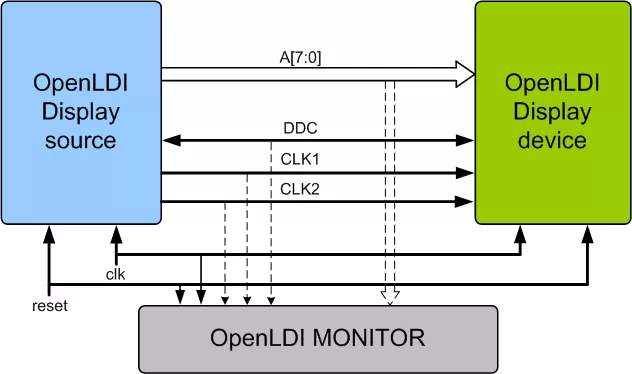
Open LVDS Display Interface(OpenLDI) specification was developed through the cooperation of companies in the semiconductor, display, computer system, connector, and cable industries to be an open standard for the digital connection of display sources and display devices. This standard is an evolution of the de facto industry standard for the connection of display controllers to LCD panels in notebook computers. The SmartDV VIP for OpenLDI is fully compliant with Standard Open LVDS Display Interface(OpenLDI) Specification.
Open LVDS Display Interface (OpenLDI) Verification IP is supported natively in SystemVerilog, VMM, RVM, AVM, OVM, UVM, Verilog, SystemC, VERA, Specman E and non-standard verification env
Open LVDS Display Interface (OpenLDI) Verification IP comes with optional Smart Visual Protocol Debugger (Smart ViPDebug), which is GUI based debugger to speed up debugging.
Learn more about Single-Protocol PHY IP core
UniversalFlash Storage (UFS) was created for mobile applications and computer systems requiring high performance and low power consumption. These systems typically use embedded Flash based on the JEDEC standard eMMC. UFS was defined by JEDEC as the evolutionary replacement for eMMC offering significantly higher memory bandwidth. The standard builds on existing standards such as the SCSI command set, the MIPI Alliance M-PHY and UniPro as well as eMMC form factors to simplify adoption and development.
In this paper, we introduce a new high-level, dataflow programming language called C~ (“C flow”) that further increases productivity by raising the level of abstraction from behavioral descriptions, while overcoming the limitations of C for hardware design. We present the syntax and semantics of this language, and the framework that provides hardware and software code generation. This paper illustrates the benefits of using C~ for hardware design of a IEEE 802.3 MAC, synthesized for FPGA and for 90nm CMOS technology.
Universal Flash Storage (UFS) was created for mobile applications and computer systems requiring high performance and low power consumption. These systems typically use embedded Flash based on the JEDEC standard eMMC. UFS was defined by JEDEC as the evolutionary replacement for eMMC offering significantly higher memory bandwidth. The standard builds on existing standards such as the SCSI command set, the MIPI Alliance M-PHY and UniProSM as well as eMMC form factors to simplify adoption and development.
Since MIPI and MDDI standards both target interfaces to cameras and displays on mobile devices, are two separate standards really needed?
Enter the Inner Sanctum of RapidIO: Part 1
Networking software key to PICMG 2.16 optimization